
How it works
Sirro gives AI coding agents a durable memory layer outside your repositories. Save once, reuse everywhere.
The problem
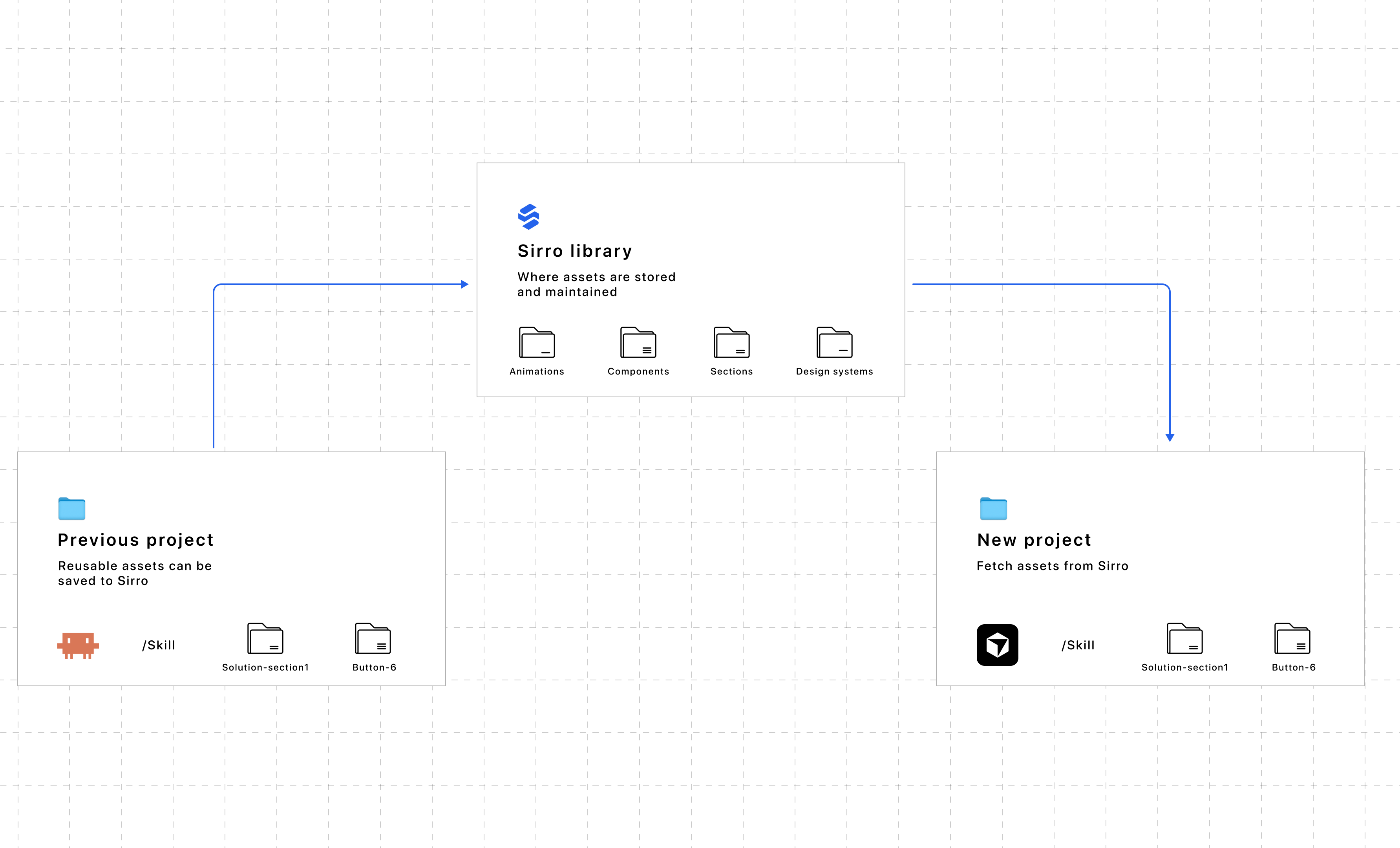
AI coding agents are fast, but they start fresh in every new repo. Teams rebuild the same buttons, hero sections, prompts, and workflow patterns again and again. Copy-paste does not scale. README snippets get stale. Context windows forget what you built last month.
Sirro solves this with a dedicated library that lives outside any Git repository and is addressable by name.
The workflow
What you can save
Sirro is built for reusable building blocks teams use across projects:
- React and UI components
- animations and motion patterns
- page sections and layouts
- prompts and agent instructions
- code patterns and snippets
- reference links and documentation
Solo and team libraries
Personal workspaces keep your own assets private. Team workspaces share one library across members so everyone and every connected agent works from the same source of truth.
See Pricing for workspace limits and team options.
Building blocks
Everything you keep in Sirro is a building block your agent can reach for while it works. Save a component, a prompt, or a pattern once, then ask for it by name in the next project. No copy-paste, no browser tabs, no manual file shuffling.
Get started
Create a free account, then follow the Documentation to connect your first agent. Browse Integrations for supported tools.